
- AuthorPosts
Hi,
I’m working on a project where we used the Civil Series version of your screen, but we wanted to upgrade to an Industrial version. I was able to have the graph change real time on the old (civil) screen, but when I transferred the design to the new screen, nothing happens.
Why isn’t data from the Arduino sending to the industrial series screen?
Hi,
I believe we also got the RS232 interface for the new screen as well. I am currently powering the screen through connections with the Arduino. Can you explain more about what you mean by voltage compatible between the Arduino and the screen?
The UART interface can have different implementations at the physical layer. For example, TTL signals have a voltage of 0 to +3.3 or up to +5 volts. RS-232 has a voltage of -10 to +10 volts. RS-485 does require two wires for each signal. Therefore, if, for example, Arduino has a TTL interface, and the display is RS-232, then they will not be able to communicate directly with each other, without a TTL – RS-232 converter.
Industrial series stone displays can have any of these three options, this is indicated in the exact model name in one of the last digits.The Arduino I’m using uses the RS232 interface. The civil screen used before also uses the RS232 interface and the new one I’m currently using is the RS232 interface. So, all the interfaces should align but the industrial screen is not receiving any data.
And from the computer through the terminal, the display receives commands and sends messages back?
How do I open the terminal to send data?
Download and install the terminal program – https://www.stoneitech.com/download/uart-communication-software-sscom32-2/
Connect the display to the computer via the adapter that comes with the display (make sure the jumpers on the adapter are set to RS232). Run the terminal program, select the desired port there, set the speed to 115200 and click the “Open com” button. Now you can enter commands in the bottom line and send them with the “SEND” button. A large text box will show whatever the display sends back.How do I make sure the adapters are set to RS232? I attached a picture showing the set up to the computer. Also when I apply code at the terminal would I just send a command like this?
ST<{“cmd_code”:”set_value”,”type”:”line_series”,”widget”:”line_series1″,”index”:4,”value”:38}>ET
Attachments:
You must be logged in to view attached files.
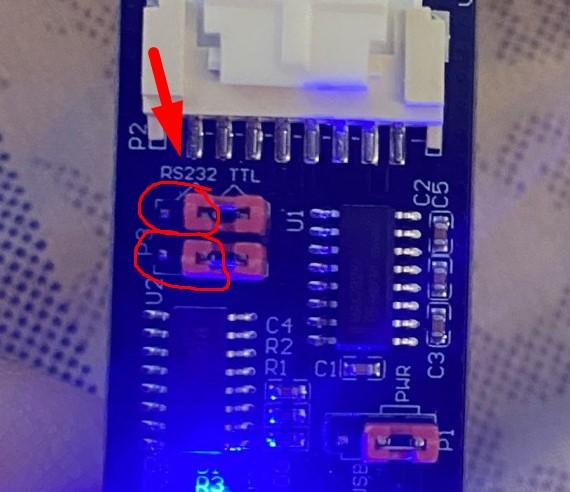
Yes, from the terminal you can send commands in text according to their description.
How do you connect that RS232 part into the screen when the UART connector is being connected to the screen?
The question is not entirely clear. The display is connected to this converter with a flat cable, the converter is connected to the computer with a USB cable – all from the display kit.
Yes? As shown in the picture earlier everything is connected how you mentioned, but how do you make sure the jumpers on the adapter are set to RS232? That part is not clear in how that part of the adapter should be connected to the screen or wherever it should be connected.
There, on the adapter board, it is indicated how the jumpers for RS232 and for TTL should be 🙂 For RS232, the jumpers should be as in the photo.
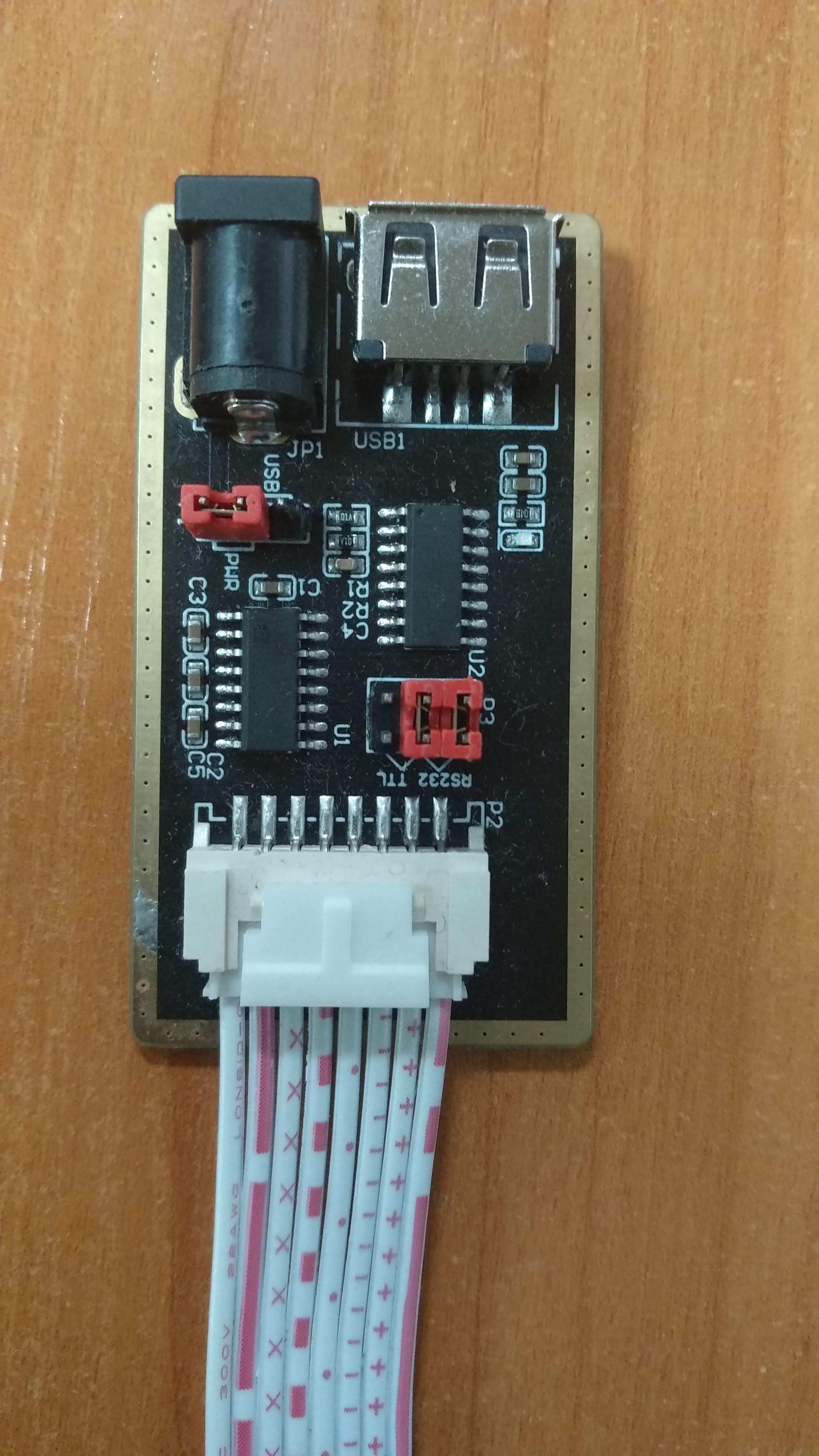
Oh! I see! Ok thank you for taking the time to explain this to me, I am a little unfamiliar with these things. The screen was able to receive data from the computer terminal but I’m not sure if anything was sent back to the computer.
Also, would connecting the screen to the Arduino be something similar? How would I ensure that the Arduino is connected to the RS232 as well with the device? Is there a more detailed tutorial on how to connect the Arduino and the industrial screen together? I attempted the tutorial “Arduino Tutorial for Beginners LY-F2 of Seven Star Bug +STONE Serial Screen” but the connection they used didn’t seem to work.
If the display were to send something back, you would see it in the terminal in a large text field.
Regarding the article at the link, I cannot comment on anything, but I got the impression that the method of connection proposed there is not entirely correct. At first glance, the data line from the display remains unconnected. But without the scheme of this converter it is difficult to say something for sure.
In general, between the Arduino board and the display, there should be a TTL – RS232 converter like this one – https://www.aliexpress.com/item/3256804526724822.html
In this capacity, you can also use the converter from the display kit, as was done in the article at your link, but I can’t say how to connect it correctly without a schematic diagram of this converter.
Another option is to convert the display from RS232 to TTL – you will need to solder a few existing jumper resistors on the display and solder a few new ones. Then the display can be connected directly to the Arduino board. Which resistors to solder and solder – you need to look at the specific display model. I think that the support of the Stone can help with this.From what it sounds like, does the Arduino not use the RS232 interface at all? Would it always need a converter and not be connected normally? I am using an Arduino Uno.
I haven’t worked with Arduinos, but it seems yes – they don’t use RS232 by default. So you need to either use a converter (it is possible that there is such a shield for Arduino, I don’t know), or redo the displays for TTL, or initially buy displays with a TTL interface.
Oh my god. Okay thank you for this information! I was just informed that the old screen my project was using was in fact TTL and not RS232. I think for now I will try the converter option and I’ll see if that works. Thank you so much for being so helpful!
ACTUALLY one last thing. Since TTL operates within a range of 3.3-5V would direct connection still be okay with the industial series screen since they operate between 7-28V or would there need to be adjustments made.
- AuthorPosts

- You must be logged in to reply to this topic.