Arduino
Arduino is an easy-to-use, easy-to-use open-source electronic prototyping platform, which contains a hardware part (various Arduino-compliant development boards) and a software part (the Arduino IDE and related development kits).
The hardware part (or development board) consists of a microcontroller (MCU), flash memory (Flash), and a set of general-purpose input/output interfaces (GPIO), which you can think of as a microcomputer motherboard.
The software part is mainly composed of the Arduino IDE on the PC and the related Board Support Package (BSP) and a rich library of third-party functions. Users can use the Arduino IDE to easily download the BSP and function libraries related to the development board you have and use them to write your programs.
Arduino is an open-source platform, and so far there have been many models and many derivative controllers, including Arduino Uno, Arduino Nano, Arduino Yún, etc. In addition, the Arduino IDE is also available today. In addition, the Arduino IDE now not only supports Arduino series development boards, but also adds support for Intel Galileo, NodeMCU and other popular development boards by introducing BSP.
The copyright of the book is owned by the author. Please contact the author for permission and credit for any form of reproduction.
The Arduino senses the environment through a wide variety of sensors, giving feedback and influencing the environment by controlling lights, motors, and other devices. The microcontroller on the development board can be programmed in the Arduino programming language, compiled to a binary file, and burned into the microcontroller. Programming the Arduino is done through the Arduino programming language (based on Wiring) and the Arduino development environment (based on Processing). Arduino-based projects can contain only Arduino, or Arduino and other software running on the PC, which communicate with each other (e.g., Flash, Processing, MaxMSP).
Development Environment
The development environment for Arduino is the Arduino IDE, which can be downloaded from the Internet.
Visit the Arduino official website for software download at https://www.arduino.cc/en/Main/Software?setlang=cn
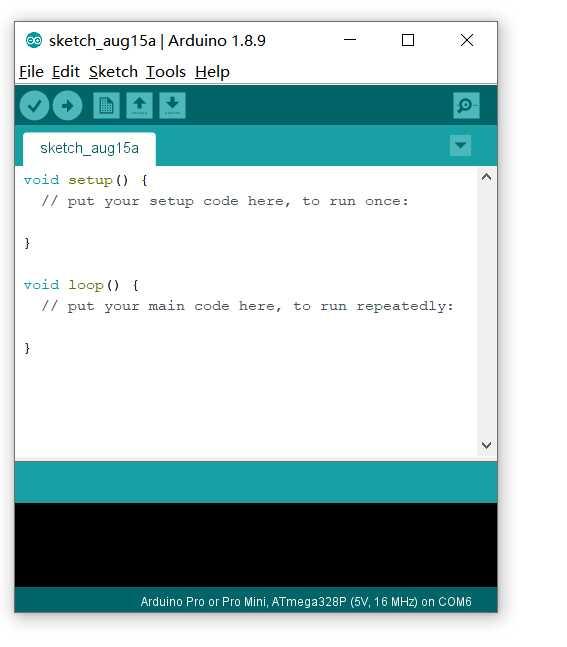
After installing the Arduino IDE, the following screen will open the software.
By default, the Arduino IDE has created two functions for us: the setup function and the loop function.
If you don’t understand it, you can go to the web directly to find it.